
Bismillahir Rahmanir Rahim. If you are using an iPhone, you may have noticed that photos are saved in a format called HEIC instead of JPG. While HEIC helps reduce file size and improve image quality, it often causes compatibility problems on Windows, Android, and many websites.
In this guide, you will learn what HEIC is, why it creates issues, and how to convert HEIC to JPG online safely.
What Is HEIC File Format?
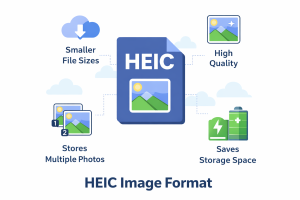
HEIC (High Efficiency Image Container) is an image format developed by Apple based on the HEIF standard. Apple introduced HEIC to save storage space while keeping image quality high.
HEIC files are mainly used on:
iPhones
iPads
Apple devices running iOS 11 or later
Compared to JPG, HEIC images are smaller in size but store more data, including depth and color information.
Why Do iPhones Use HEIC Instead of JPG?
Apple uses HEIC because it offers several advantages:
Smaller file size than JPG
Better image quality
Supports advanced features like Live Photos
Saves storage on iPhone devices
However, these advantages come with a drawback: limited compatibility outside the Apple ecosystem.
Problems with HEIC Files on Windows and Android
Many users face issues when opening HEIC images on non-Apple devices. Common problems include:
HEIC images do not open on Windows by default
Android apps may not support HEIC properly
Websites and online platforms often require JPG or PNG
HEIC files cannot be uploaded to many forms or tools
Because of these issues, converting HEIC to JPG becomes necessary.
Why Convert HEIC to JPG?
JPG is one of the most widely supported image formats in the world. When you convert HEIC to JPG:
Images open on all devices
Files can be uploaded anywhere
Compatibility issues disappear
Sharing becomes easier
This is why most users choose to convert HEIC photos before using them on websites or sending them to others.
How to Convert HEIC to JPG Online (Safely)
Many online converters require you to upload your photos to a server. This can be risky, especially if the images are personal or private.
A better solution is to use a browser-based HEIC to JPG converter that works without uploading files.
👉 You can use this secure tool to convert HEIC images directly in your browser:
HEIC to JPG Converter
https://solvetools.online/heic-to-jpg/
This tool converts HEIC images locally on your device, ensuring:
No file uploads
Full privacy
Fast conversion
High-quality JPG output
Is It Safe to Convert HEIC to JPG Online?
Yes — if the conversion happens inside your browser.
Browser-based tools process images locally, which means:
Your files never leave your device
No server storage
No tracking of image content
This makes browser-based HEIC to JPG converters the safest option available.
HEIC vs JPG: Which One Is Better?
Both formats have their use cases:
HEIC is ideal for saving storage on iPhones
JPG is best for compatibility and sharing
For everyday use, websites, and cross-platform sharing, JPG is still the most reliable choice.
Final Thoughts
HEIC is a modern image format designed to improve efficiency on Apple devices, but it can create problems when used outside the Apple ecosystem. Converting HEIC to JPG is the easiest way to solve these compatibility issues.
If you need a fast, private, and reliable solution, try this browser-based HEIC to JPG converter that works without uploading files: 👉 https://solvetools.online/heic-to-jpg/